DIY AI Project: Build an Automated Article Summarizer
One of my favorite things about working with AI and workflow automation tools is how quickly you can go from identifying a problem to solving it. In this post, I'll share a workflow that's a good example of what I mean.
The Problem
After trying Evernote, Apple Notes, and probably everything else out there, I kept falling back to just emailing links to myself (sometimes with notes for context). It worked... kind of. At least I didn't lose the links, but good luck finding anything in that inbox mess later.
The Solution
I built a Relay.app automation that keeps what works—the simple email-to-self approach—and fixes what doesn't—actually finding stuff later. The first version didn't take long at all, though I've improved it since.
Here's what it does:
- Catches emails with my "to summarize" subject line
- Grabs the URL and my notes into a Google Sheet
- Uses AI to scrape and summarize the article (both a short summary and detailed notes)
- Organizes everything with dates, links to Google Docs with full summaries, and my original notes
Now when I want to remember what I read, everything's right there in a format I can actually search and filter. No more headaches trying to dig up that one article from three months ago.
How the Workflow Works
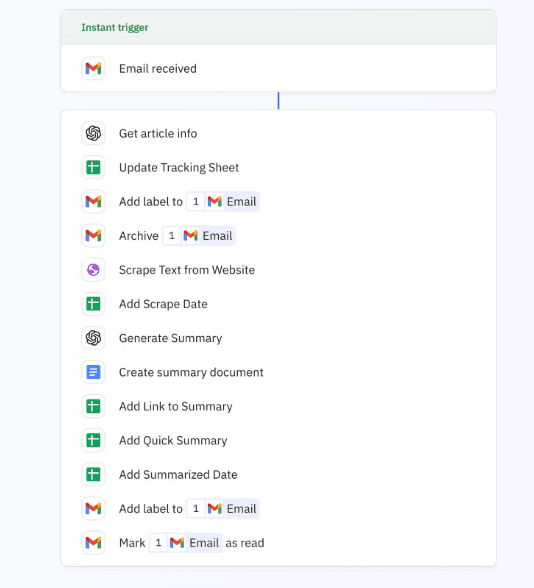
The workflow is triggered when an email is received with a particular subject line. Once triggered, an AI step extracts the URL and any notes I've added from the email body.
This updates a tracking sheet with the link, my notes, and the date, then adds a label to the email and archives it. After that, Relay.app has a handy built-in tool to scrape text from the website, which gets passed to ChatGPT to generate a summary with the information I want.
That summary information is incorporated into a new Google document where we add the article title, URL, publish date, a short summary, and key points. The information is then added to a summary sheet, including the quick summary so I can easily go back and take a look at it. The summarize date is added because I'll always want to be able to search by when this work was done. The workflow completes by adding a final label to the email and marking it as read.
When you go to the tracking sheet, you see the link, my notes, all the date information, a quick summary, and then a link to the full summary in Google Drive.
What You'll Need
- Gmail account
- Google account (for Sheets and Docs)
- Relay.app account (free tier works fine)
- About 30 minutes to set it up
Building Your Own
This automation uses Gmail, Google Sheets, and some AI steps to organize and summarize articles. Here's the basic structure:
Set up the trigger to watch for emails with your chosen subject line (I use "to summarize").
Add an AI extraction step that pulls the article URL and any notes from your email body. This lets you email yourself naturally without worrying about formatting.
Create a tracking sheet that logs the URL, your notes, and timestamps. Have the workflow add a label to the original email and archive it to keep your inbox clean.
Use Relay's website scraper to grab the article text. This built-in tool handles the complexity for you.
Set up a ChatGPT step to analyze the content and generate both a quick summary and detailed key points. I have it extract the article title, publish date, a 2-3 sentence summary, and 5-7 key insights.
Create a Google Doc with the full summary and save it to a dedicated folder. Then update your tracking sheet with the summary and a link to the doc.
Add final cleanup by labeling the email as summarized and marking it read.
Why This Works
Sometimes the best workflow is the one you build yourself when you're tired of dealing with clunky alternatives. This automation succeeds because it doesn't try to change your behavior—it enhances what you're already doing.
The beauty is in the combination: email's simplicity for capturing, Google Sheets' power for organizing, and AI's capability for summarizing. Each tool does what it does best.
I hope this automation example is useful to you. If you want help building something similar or customizing it for your specific needs, reach out. We love helping people build workflows that actually make their lives easier.